Feeder & Vacuum Monitoring
Loading data from server...
Total Feeder
0Feeder OK
0Feeder NG
0Maintenance
0Recent Status Feeder
| ID-Machine | Machine | Line | Week | Status | Last Update | PIC | Remarks |
|---|
Avg Vacuum
0Max Vacuum
0Min Vacuum
0Alert
0Bacaan Vakuum
Data Terkini
| ID-Machine | Machine | Line | Week | Vakuum | Status | Last Update | PIC | Remarks |
|---|
Pilih Line (Vacuum Trend):
Pilih Line (Feeder Trend):
Total Log
0Hari Ini
0Log NG
0Maintenance
0Arkib Log
50 rekod/halaman
| Tarikh | Week | ID-Machine | Machine | Line | Status | Vacuum | PIC | Remarks |
|---|
Menunjukkan 0 daripada 0 rekod
Troubleshooting Guide
Klik pada langkah untuk menelusuri flowchart masalah.
Gambar Rajah Komponen
Klik untuk besarkan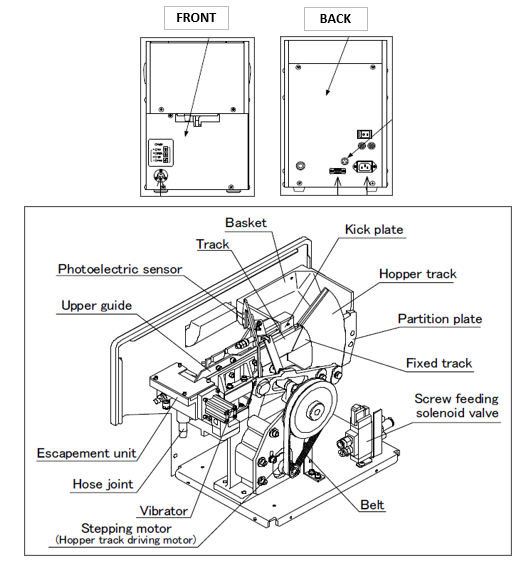
Check Items First
- Check if the use environment is correct.
- Check if the power supply voltage is within range, and ground is connected.
- Check if the air pressure supply is within range.
- Check if the POWER LED on the Setup panel is lit.
- Check if the LED indicates "Normal running" status.
Nota Penting:
Jika masalah berulang dalam 3 hari berturut-turut atau melibatkan >2 mesin dalam line sama, sila eskalasi kepada penyelia.